> ## Documentation Index
> Fetch the complete documentation index at: https://docs.neolli.jocoding.io/llms.txt
> Use this file to discover all available pages before exploring further.
# AI Dubbing
> Generate dubbed audio tracks that clone the original speaker's voice.
## Overview
Dubbing generates a new audio track for your video in the target language, using a voice that sounds like the original speaker. This goes beyond subtitles — viewers hear the content in their language with the creator's own voice characteristics.
## Supported dubbing languages
Voice cloning is supported for **10 languages**:
| Flag | Language | Code |
| ---- | ---------- | ----- |
| 🇺🇸 | English | `eng` |
| 🇨🇳 | Chinese | `zho` |
| 🇰🇷 | Korean | `kor` |
| 🇮🇹 | Italian | `ita` |
| 🇪🇸 | Spanish | `spa` |
| 🇧🇷 | Portuguese | `por` |
| 🇩🇪 | German | `deu` |
| 🇫🇷 | French | `fra` |
| 🇯🇵 | Japanese | `jpn` |
| 🇷🇺 | Russian | `rus` |
For the full capabilities matrix across transcription, translation, and dubbing, see [Supported Languages](/workflows/supported-languages).
## How voice cloning works
The voice cloning process works in three steps:
1. **Profile** — Creates a voice profile from the original speaker's audio
2. **Synthesize** — Generates speech in the target language using the cloned voice
3. **Calibrate** — Adjusts audio duration to match the original segment timing
Individual segment audio is merged into complete audio tracks for each language.
## Starting a dubbing job
1. From **Add Languages**, select your target languages
2. Enable the **Dubbing** toggle alongside (or instead of) captions
3. Click **Start**
Dubbing jobs run after translation completes — the translated text is what gets synthesized into speech.
## Reviewing dubbed audio
Once complete, open the video workspace and select the dubbed language track. The video player plays the dubbed audio synced with the video so you can review before publishing.
## Downloading dubbed audio
Click the download icon on any completed language card to access:
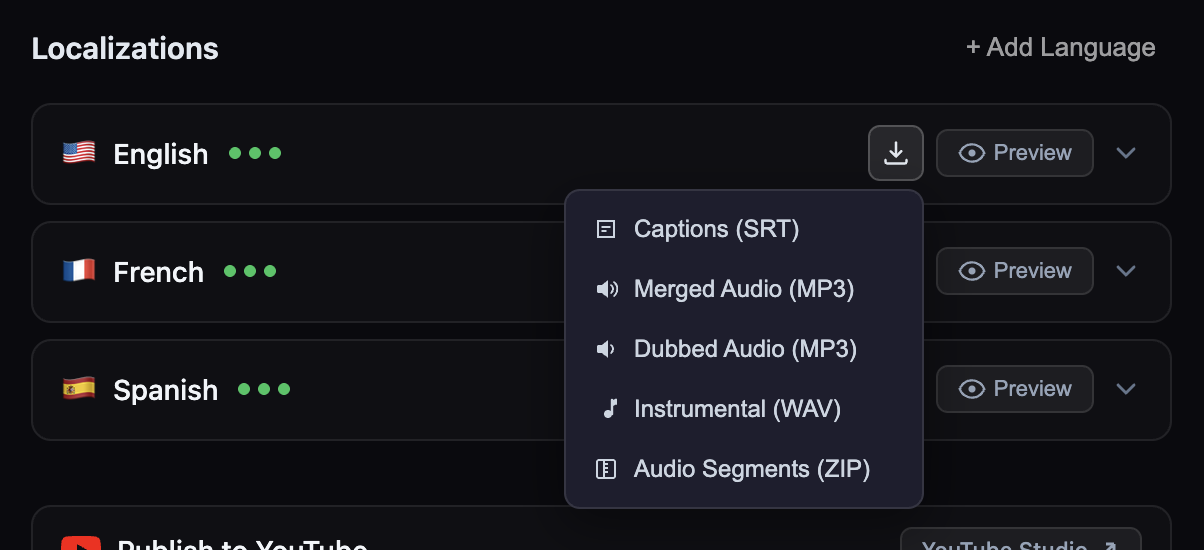 * **Merged Audio (MP3)** — Dubbed speech mixed with the instrumental background track
* **Dubbed Audio (MP3)** — Dubbed speech only, no background audio
* **Instrumental (WAV)** — Background audio only (extracted from original)
* **Audio Segments (ZIP)** — Individual WAV files for each segment
See [Exporting](/workflows/exporting) for details on all download formats.
## Tips for best results
* **Single clear speaker** — Videos with one speaker produce the best cloning results
* **Minimal background noise** — Heavy music or ambient noise degrades voice clone quality
* **Sufficient reference audio** — Videos under 30 seconds may not provide enough audio for accurate cloning
* **Edit dubbed captions** — If synthesis sounds unnatural, try editing the translated caption text to be shorter or simpler — the dubbed audio will regenerate
## Music content detection
Neolli automatically analyzes audio to detect whether a video contains primarily music rather than speech. This check runs during the first dubbing attempt for each video.
**What happens when music is detected:**
1. The dubbing job fails immediately with a `music_detected` error (credits are automatically refunded)
2. The video is permanently flagged as music content
3. All future dubbing requests for that video are blocked — both from the localization modal and per-language "Generate Dubbing" buttons
4. Transcription, translation, and caption generation remain available
Once a video is flagged as music content, dubbing cannot be enabled for it. If you believe the detection was incorrect, contact support. Other workflows (transcription, translation, captions) are not affected.
## Credit cost
Dubbing is charged at **250 credits per 1,000 characters** of source text, per language. See [Credit Costs](/billing/credit-costs) for a detailed breakdown.
* **Merged Audio (MP3)** — Dubbed speech mixed with the instrumental background track
* **Dubbed Audio (MP3)** — Dubbed speech only, no background audio
* **Instrumental (WAV)** — Background audio only (extracted from original)
* **Audio Segments (ZIP)** — Individual WAV files for each segment
See [Exporting](/workflows/exporting) for details on all download formats.
## Tips for best results
* **Single clear speaker** — Videos with one speaker produce the best cloning results
* **Minimal background noise** — Heavy music or ambient noise degrades voice clone quality
* **Sufficient reference audio** — Videos under 30 seconds may not provide enough audio for accurate cloning
* **Edit dubbed captions** — If synthesis sounds unnatural, try editing the translated caption text to be shorter or simpler — the dubbed audio will regenerate
## Music content detection
Neolli automatically analyzes audio to detect whether a video contains primarily music rather than speech. This check runs during the first dubbing attempt for each video.
**What happens when music is detected:**
1. The dubbing job fails immediately with a `music_detected` error (credits are automatically refunded)
2. The video is permanently flagged as music content
3. All future dubbing requests for that video are blocked — both from the localization modal and per-language "Generate Dubbing" buttons
4. Transcription, translation, and caption generation remain available
Once a video is flagged as music content, dubbing cannot be enabled for it. If you believe the detection was incorrect, contact support. Other workflows (transcription, translation, captions) are not affected.
## Credit cost
Dubbing is charged at **250 credits per 1,000 characters** of source text, per language. See [Credit Costs](/billing/credit-costs) for a detailed breakdown.