> ## Documentation Index
> Fetch the complete documentation index at: https://docs.neolli.jocoding.io/llms.txt
> Use this file to discover all available pages before exploring further.
# Exporting
> Download captions, dubbed audio, and instrumental tracks in multiple formats.
## Available formats
Once a job completes, you can download results from the language card in the video workspace. Click the download icon to see all available options.
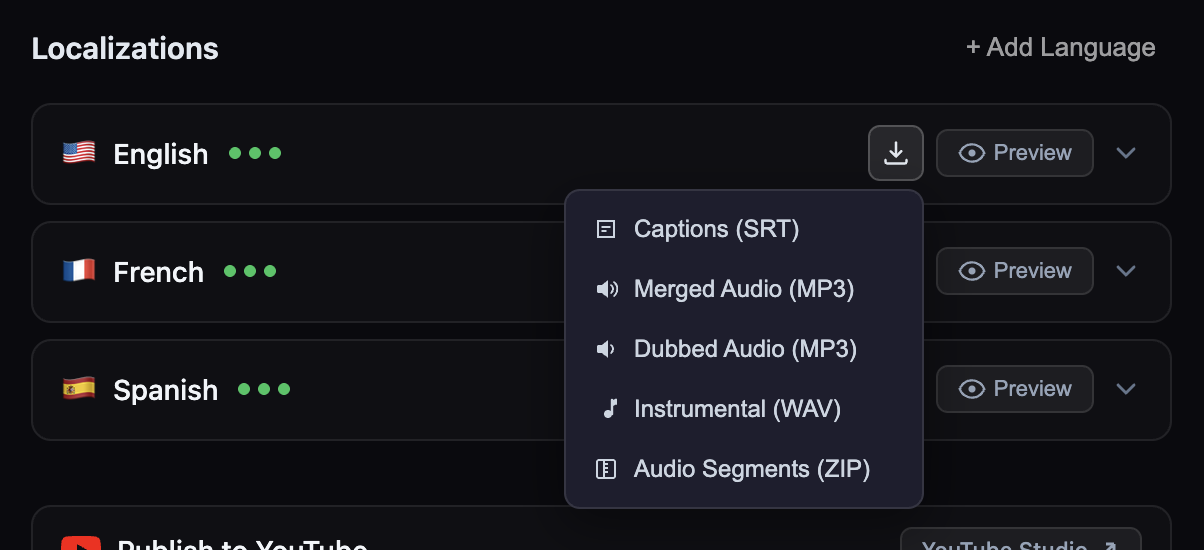 **SubRip Text format** — The industry-standard caption file format. Contains timestamped text segments compatible with virtually all video players, editing software, and platforms.
* Available for all caption tracks (source and translated)
* Includes segment numbers, timestamps, and text
* UTF-8 encoded for full international character support
**Dubbed speech + instrumental background** — A complete audio track that combines the AI-dubbed speech with the extracted instrumental/background audio from the original video.
* Only available when dubbing is completed for the language
* Only available when instrumental separation was successful
* MP3 format for broad compatibility
**Dubbed speech only** — The AI-generated speech track without any background audio. Useful for custom mixing in your own editing software.
* Available for all completed dubbing tracks
* Contains only the synthesized speech segments
* MP3 format
**Background audio only** — The extracted instrumental/background track from the original video, with speech removed. Useful for remixing or custom dubbing workflows.
* WAV format (24kHz, 16-bit PCM) for lossless quality
* Extracted from the original video's audio
* May not be available if the original has no background audio
**Individual segment audio files** — A ZIP archive containing separate WAV files for each dubbed segment. Useful for granular editing, review, or integration with other tools.
* One WAV file per caption segment
* Files named by segment index for easy ordering
* WAV format (24kHz, 16-bit PCM)
## How to download
1. Open the video workspace
2. Find the completed language track
3. Click the **download icon** on the language card
4. Select the format you want
Downloads start immediately in your browser.
## YouTube upload
For YouTube videos, you can push captions and localized metadata directly instead of downloading. See [YouTube Integration](/workflows/youtube) for details.
**Formats not currently supported**: VTT (WebVTT), ASS/SSA (Advanced SubStation), batch export across all languages, and burned-in (hardcoded) subtitles. SRT files can be converted to other formats using free tools like Subtitle Edit or FFmpeg.
**SubRip Text format** — The industry-standard caption file format. Contains timestamped text segments compatible with virtually all video players, editing software, and platforms.
* Available for all caption tracks (source and translated)
* Includes segment numbers, timestamps, and text
* UTF-8 encoded for full international character support
**Dubbed speech + instrumental background** — A complete audio track that combines the AI-dubbed speech with the extracted instrumental/background audio from the original video.
* Only available when dubbing is completed for the language
* Only available when instrumental separation was successful
* MP3 format for broad compatibility
**Dubbed speech only** — The AI-generated speech track without any background audio. Useful for custom mixing in your own editing software.
* Available for all completed dubbing tracks
* Contains only the synthesized speech segments
* MP3 format
**Background audio only** — The extracted instrumental/background track from the original video, with speech removed. Useful for remixing or custom dubbing workflows.
* WAV format (24kHz, 16-bit PCM) for lossless quality
* Extracted from the original video's audio
* May not be available if the original has no background audio
**Individual segment audio files** — A ZIP archive containing separate WAV files for each dubbed segment. Useful for granular editing, review, or integration with other tools.
* One WAV file per caption segment
* Files named by segment index for easy ordering
* WAV format (24kHz, 16-bit PCM)
## How to download
1. Open the video workspace
2. Find the completed language track
3. Click the **download icon** on the language card
4. Select the format you want
Downloads start immediately in your browser.
## YouTube upload
For YouTube videos, you can push captions and localized metadata directly instead of downloading. See [YouTube Integration](/workflows/youtube) for details.
**Formats not currently supported**: VTT (WebVTT), ASS/SSA (Advanced SubStation), batch export across all languages, and burned-in (hardcoded) subtitles. SRT files can be converted to other formats using free tools like Subtitle Edit or FFmpeg.