> ## Documentation Index
> Fetch the complete documentation index at: https://docs.neolli.jocoding.io/llms.txt
> Use this file to discover all available pages before exploring further.
# Translation
> Generate natural-sounding captions in 30 languages from your source transcript.
## Overview
Translation takes your transcribed captions and produces natural, spoken-register captions in your target languages. Unlike literal machine translation, Neolli's pipeline is specifically tuned for video captions — it accounts for sentence boundaries, speaker context, timing constraints, and language-specific patterns.
## Adding languages
1. From the video workspace, click **Add Languages**
2. Select target languages from the grid, or use a **preset** (Top 3, Top 5, Top 10)
3. Choose whether to generate **captions**, **dubbing**, or **both**
4. Click **Start**
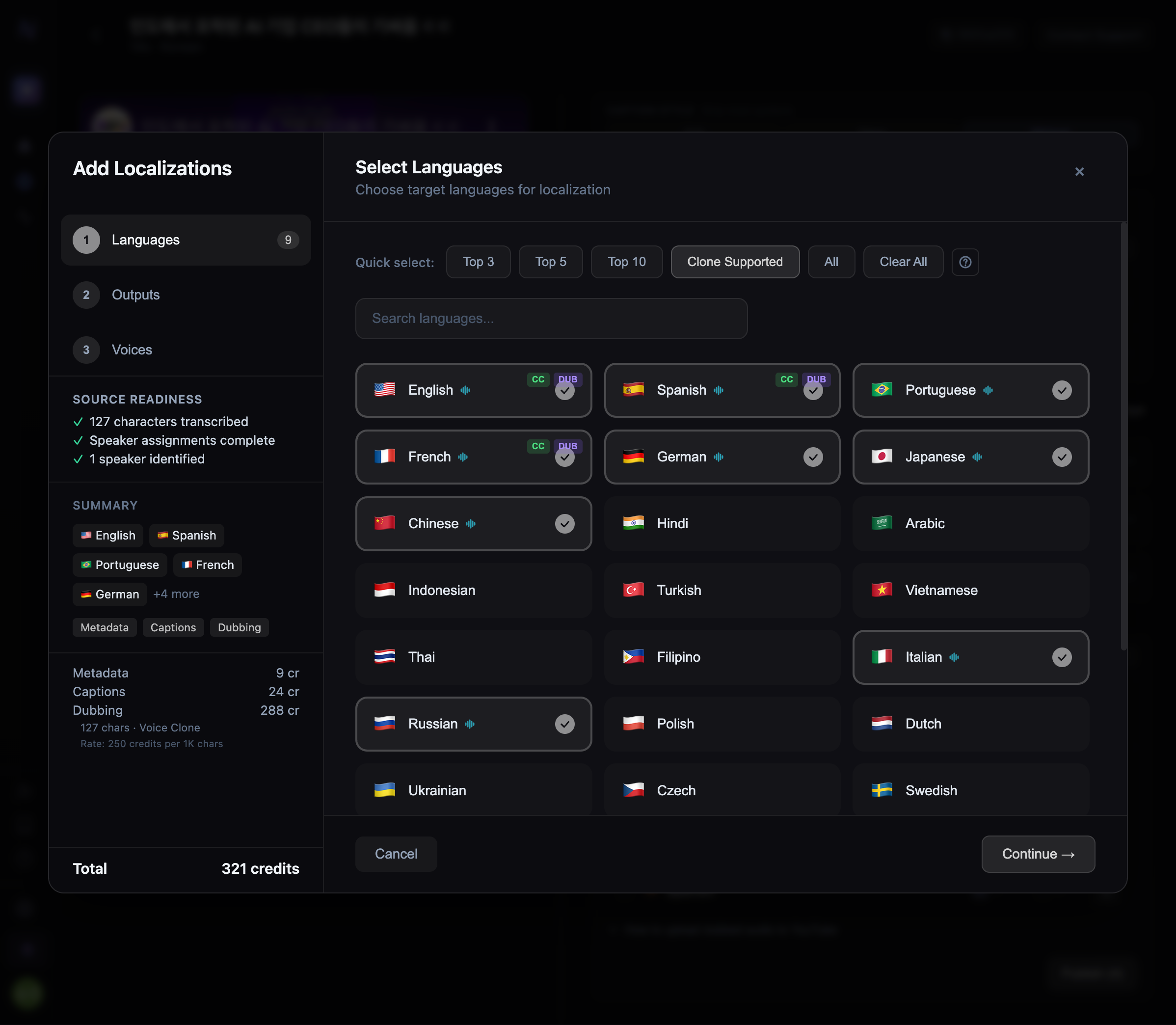 **Language presets** select the most popular YouTube audience languages by reach. Top 3 covers \~60% of global YouTube viewers, Top 10 covers \~85%.
## Supported languages
Neolli supports translation into **30 languages**. See [Supported Languages](/workflows/supported-languages) for the full matrix with transcription and dubbing availability.
## How translation works
Neolli uses a **3-pass translation pipeline** to balance accuracy, timing, and natural speech:
For caption translation, the pipeline runs three passes:
1. **Translate** — Sentence-aware translation that groups related segments and translates them as complete thoughts, maintaining speaker context and continuity
2. **Condense** — Shortens any segments that exceed their available display time, keeping a naturalness floor (minimum 3 words) to avoid choppy output
3. **Polish** — Fixes language-pair-specific issues like missing subjects (Korean), passive voice overuse (Japanese), or unnatural word order
Each pass is powered by Google Gemini, tuned for spoken-register output with language-specific guidance for all 30 languages.
For dubbing, translation uses **content windows** — complete thought units that may span multiple caption segments. This produces more natural speech for voice synthesis:
1. **Window construction** — Groups segments by speaker, gap threshold, and sentence boundaries
2. **Translation** — Translates entire windows as coherent units
3. **Distribution** — Maps translated text back to individual segment timestamps
The result is dubbed audio that flows naturally while staying synchronized with the video.
## Metadata translation
When you translate a video, Neolli also translates the video's **title and description** into each target language. This is especially useful when [pushing to YouTube](/workflows/youtube), where localized metadata helps international discoverability.
## Editing translations
After translation completes, you can edit any segment in the [caption editor](/workflows/caption-editor). Changes are saved as a new version — you can switch between the AI-generated original and your edits at any time.
## Credit cost
Translation is charged at **31 credits per 1,000 characters** of source text, per language. A typical 10-minute video contains roughly 7,500 characters of speech. See [Credit Costs](/billing/credit-costs) for a detailed breakdown.
**Language presets** select the most popular YouTube audience languages by reach. Top 3 covers \~60% of global YouTube viewers, Top 10 covers \~85%.
## Supported languages
Neolli supports translation into **30 languages**. See [Supported Languages](/workflows/supported-languages) for the full matrix with transcription and dubbing availability.
## How translation works
Neolli uses a **3-pass translation pipeline** to balance accuracy, timing, and natural speech:
For caption translation, the pipeline runs three passes:
1. **Translate** — Sentence-aware translation that groups related segments and translates them as complete thoughts, maintaining speaker context and continuity
2. **Condense** — Shortens any segments that exceed their available display time, keeping a naturalness floor (minimum 3 words) to avoid choppy output
3. **Polish** — Fixes language-pair-specific issues like missing subjects (Korean), passive voice overuse (Japanese), or unnatural word order
Each pass is powered by Google Gemini, tuned for spoken-register output with language-specific guidance for all 30 languages.
For dubbing, translation uses **content windows** — complete thought units that may span multiple caption segments. This produces more natural speech for voice synthesis:
1. **Window construction** — Groups segments by speaker, gap threshold, and sentence boundaries
2. **Translation** — Translates entire windows as coherent units
3. **Distribution** — Maps translated text back to individual segment timestamps
The result is dubbed audio that flows naturally while staying synchronized with the video.
## Metadata translation
When you translate a video, Neolli also translates the video's **title and description** into each target language. This is especially useful when [pushing to YouTube](/workflows/youtube), where localized metadata helps international discoverability.
## Editing translations
After translation completes, you can edit any segment in the [caption editor](/workflows/caption-editor). Changes are saved as a new version — you can switch between the AI-generated original and your edits at any time.
## Credit cost
Translation is charged at **31 credits per 1,000 characters** of source text, per language. A typical 10-minute video contains roughly 7,500 characters of speech. See [Credit Costs](/billing/credit-costs) for a detailed breakdown.